
Data Dashboards for SMEs: Your 30-Day Implementation Plan
Many SMEs in Southeast Asia still rely on manual spreadsheets, hindering agile decision-making. This guide provides a practical, 30-day roadmap to transition from fragmented data to powerful, insightful business dashboards.
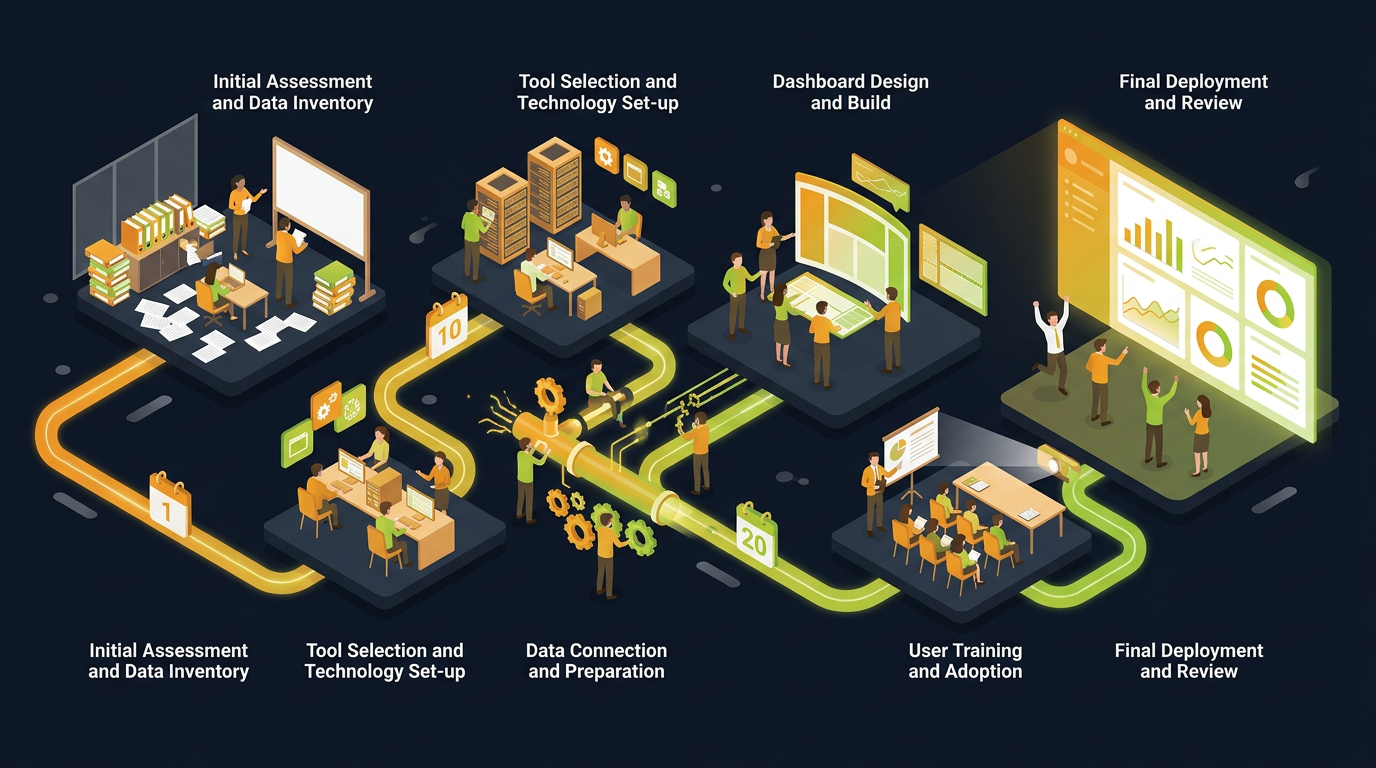
For many Small and Medium-sized Enterprises (SMEs) across Vietnam and the Philippines, data is abundant, yet insights are scarce. Piles of spreadsheets, manually updated and often disconnected, create more confusion than clarity. This reliance on outdated methods severely limits strategic agility and operational efficiency. Imagine a world where your key business metrics are instantly accessible, visually compelling, and always up-to-date. This isn't a distant future; it's an achievable goal, and we’re here to show you how to get there in just 30 days.
This article outlines a pragmatic 30-day plan for SMEs to transition from static spreadsheets to dynamic data dashboards. This digital transformation isn't just about pretty charts; it's about empowering smarter, faster decision-making, optimizing processes, and ultimately, driving sustainable growth. We'll guide you through defining your needs, selecting the right tools, implementing your first dashboards, and fostering a data-driven culture within your organization.
Week 1: Foundation & Planning (Days 1-7)
Day 1-2: Define Your Core Business Questions
Before you even think about software, identify what problems you're trying to solve and what questions you need answers to. Don't start with the data; start with the business objective. What keeps you awake at night? What metrics directly impact your profitability or customer satisfaction? Engage key stakeholders from different departments.
- Sales: What's our conversion rate? Which products are most profitable? How effective are our sales reps?
- Marketing: What's the ROI of our latest campaign? Which channels perform best? What's our customer acquisition cost?
- Operations: What's our average order fulfillment time? What are our inventory levels? Are we meeting our service level agreements?
- Finance: What's our cash flow projection? What are our top expenses? How are we tracking against budget?
Day 3-4: Inventory Your Data Sources
Now that you know what questions to ask, identify where the answers live. This is often where spreadsheets come into play, but also consider:
- Accounting software (e.g., Xero, QuickBooks)
- CRM systems (e.g., Salesforce, HubSpot)
- ERP systems (if applicable)
- Marketing platforms (e.g., Google Analytics, Facebook Ads Manager)
- Customer service tools
- POS systems
Prioritize the most critical data sources that directly address your core business questions. Focus on data quality – inaccurate data leads to misleading dashboards.
Day 5-7: Select Your Dashboard Tools
For SMEs, complex enterprise solutions are often overkill and too expensive. Focus on user-friendly, cost-effective options. Consider:
- Google Data Studio (Looker Studio): Free, integrates well with Google services (Analytics, Sheets), powerful visualizations.
- Microsoft Power BI: Strong integration with Microsoft products (Excel, Azure), robust features, free desktop version, paid cloud service.
- Tableau Public/Desktop: Industry leader for visualization, but can be more expensive. Tableau Public is free but data is public.
- Zoho Analytics: Part of the Zoho ecosystem, good for SMEs already using Zoho products.
- Excel/Google Sheets with Charts: For very small-scale needs, simple dashboards can be built directly in spreadsheets, though they lack automation.
Selection Criteria:
- Ease of Use: How quickly can your team learn it?
- Connectivity: Can it connect to your existing data sources?
- Cost: Does it fit your budget?
- Scalability: Can it grow with your business?
- Community Support: Are there resources and forums for help?
Week 2: Data Consolidation & Initial Build (Days 8-14)
Day 8-10: Data Extraction & Cleaning
This is arguably the most critical and often most time-consuming step. Data from different sources will be in different formats. You'll need to extract it and often perform some level of cleaning and transformation.
- Export: Extract data from your identified sources into a consistent format, typically CSV or Excel.
- Clean: Look for inconsistencies, duplicates, missing values, and incorrect data types. Standardize names, dates, and units.
- Combine: Merge data from different sources if necessary. For example, combine sales data with marketing spend to calculate ROI.
Tools like Microsoft Excel, Google Sheets, or even simple Python scripts (if you have the expertise) can help with this. The goal is to prepare a clean, unified dataset ready for analysis.
Day 11-14: Build Your First Dashboard Prototype
Start simple. Focus on 3-5 key metrics that directly answer your most critical business questions. Don't try to cram everything into one dashboard. Each dashboard should have a clear purpose.
- Choose a Template: Many dashboard tools offer pre-built templates. Start with one that closely matches your needs.
- Connect Data: Link your cleaned data to your chosen dashboard tool.
- Visualize Key Metrics: Use appropriate chart types:
- Line charts for trends over time.
- Bar charts for comparisons.
- Pie charts for proportions (use sparingly).
- Scorecards for single, critical numbers.
- Layout: Organize elements logically. Important metrics should be prominent. Use clear titles and labels.
Week 3: Refinement & Feedback (Days 15-21)
Day 15-17: Internal Review & Feedback Collection
Present your prototype dashboard to the stakeholders you engaged in Week 1. This is crucial for user adoption and ensuring the dashboard actually meets their needs. Encourage honest feedback.
Ask questions like:
- Is the information clear and easy to understand?
- Does it answer the questions we set out to answer?
- Is anything missing or redundant?
- How could this dashboard be more useful to your daily work?
- Are the colors and layout intuitive?
Day 18-21: Iterate & Improve
Based on the feedback, make necessary adjustments. This might involve:
- Adding new metrics or removing less relevant ones.
- Changing visualization types for better clarity.
- Adjusting data filters or date ranges.
- Improving data refresh rates or automation.
- Refining the overall layout and design.
Remember, dashboards are iterative. They evolve as your business needs change. Don't aim for perfection in the first iteration, aim for utility.
Week 4: Automation, Training & Culture (Days 22-30)
Day 22-24: Automate Data Refresh
Manual data updates defeat the purpose of dynamic dashboards. Set up automated data refreshes wherever possible. Most dashboard tools offer connectors and scheduling options for this. This might involve direct database connections, scheduled file uploads, or API integrations.
- Direct Connectors: Link your dashboard tool directly to your data sources (e.g., Google Analytics, CRM).
- Scheduled Uploads: For static files, schedule regular uploads.
- ETL (Extract, Transform, Load) Tools: For more complex integrations, consider simple ETL tools that can automate data pipelines.
Day 25-27: Training & Documentation
Even the best dashboard is useless if no one knows how to use it. Conduct training sessions for your team. Show them how to navigate, interpret, and leverage the insights from the dashboards.
- Basic Navigation: How to open, view, and understand the main components.
- Filtering & Interactivity: How to drill down into data, apply filters, and change date ranges.
- Interpretation: What do the numbers mean? What actions can be taken based on the insights?
- Documentation: Create a simple guide on how to use and understand the dashboard, including data definitions.
Day 28-30: Foster a Data-Driven Culture & Plan for Expansion
This is where the real transformation happens. Encourage your team to regularly check the dashboards and use them in their decision-making. Make dashboard reviews a standard part of team meetings. Celebrate successes derived from data insights.
- Regular Review: Incorporate dashboard reviews into weekly or monthly team meetings.
- Empowerment: Encourage team members to ask data-driven questions and propose solutions.
- Continuous Improvement: Identify new metrics, build more dashboards for other departments, and continuously refine existing ones. Consider adding predictive analytics or more advanced features as your team's data literacy grows.
By following this 30-day plan, your SME can move from being reactive to proactive, leveraging the power of data dashboards to drive informed decisions and sustainable growth. This journey is a significant step in your digital transformation, placing valuable insights directly into the hands of your team.
FAQ
Q1: What's the biggest challenge for SMEs adopting data dashboards?
A1: The biggest challenge is often data quality and consistency. Data living in disparate spreadsheets or systems, often with errors or inconsistent formatting, needs significant cleaning and standardization before it can be effectively used in dashboards. Addressing this early is crucial.
Q2: Do I need a data analyst for this 30-day plan?
A2: While a dedicated data analyst can accelerate the process, many modern dashboard tools are designed for business users. With proper planning and tool selection, a tech-savvy business owner or an existing team member with an analytical mindset can lead this initiative, especially for the initial dashboards.
Q3: How often should our dashboards be updated?
A3: The frequency depends on the metric and its criticality. Sales figures might need daily updates, while monthly financial summaries can be sufficient. The goal is to provide data that is fresh enough to be actionable without creating unnecessary overhead. Automation is key to achieving optimal refresh rates.
Ready to transform your data into actionable insights? Contact LIMONCG today to discuss how we can accelerate your digital transformation journey. /contact

